
Spins of Glory Casino Login and Registration Guide
You want to get in fast, stay secure, and never struggle with access, right? At Spins of Glory Casino, we’ve kept login and registration simple, whether you’re on desktop, mobile, or jumping between both. In this guide, we’ll walk you through creating your account, logging in from different devices, and keeping your credentials safe and easy to manage.
Introduction to Account Registration
When you register at Spins of Glory Casino, you unlock everything in one go: casino, live games, sportsbook, tournaments, shop, and VIP. You only need one profile and one login to move between all sections. The whole sign-up flow at Spins of Glory Casino takes just a couple of minutes if you have your basic details ready.
During registration, you’ll enter things like your email, full name, address, date of birth, and phone number. This isn’t just bureaucracy; it’s how we keep your account compliant with age checks, anti‑fraud, and KYC rules while protecting your money and bonuses. Once your profile is created and verified, deposits, withdrawals, and bonus claiming become much smoother.
How to Create Your Account
Let’s walk you through how to open your account step by step. You can do this on a desktop or a mobile browser, and the flow is almost identical.
Step-by-Step Registration Process
Let’s see the process step-by-step:
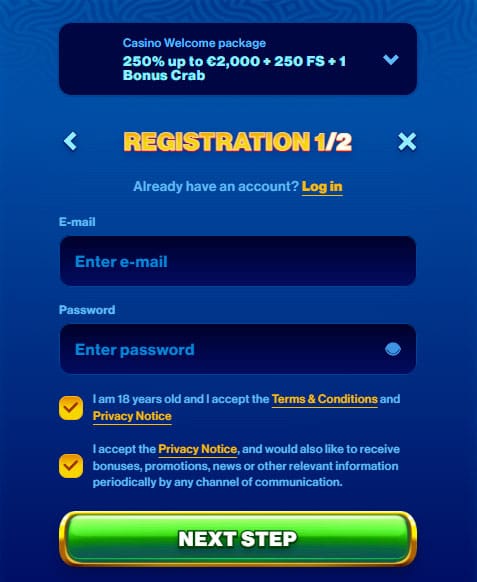
- Go to the Spins of Glory Casino website and hit the “Register” or “Join Now” button at the top of the page.
- Choose your country and currency if prompted, then enter your email and create a password.
- Fill in your personal details: full name, date of birth, home address, and mobile number.
- Confirm you’re over 18 and accept the terms and privacy policy, plus marketing options if you want them.
- Submit the form and wait for the account creation confirmation on screen and in your email inbox.
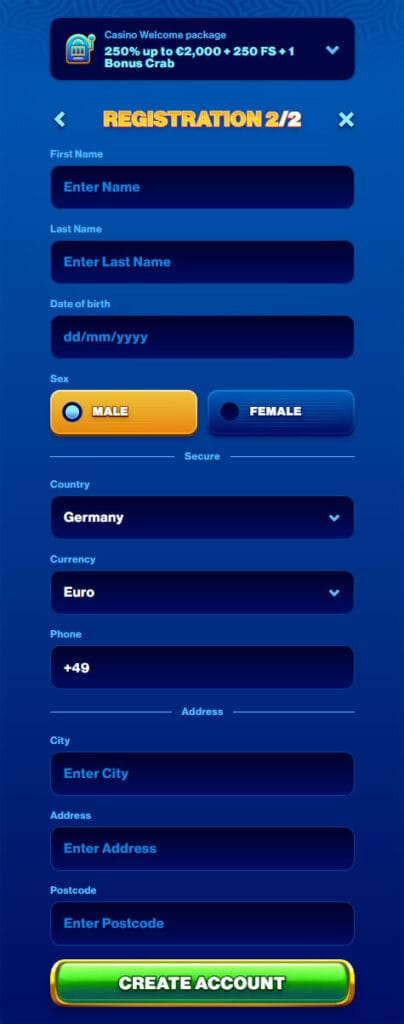
Once that’s done, you already have a playable account. You can browse games and lobby sections right away, but to deposit and withdraw smoothly, you’ll want to verify your email and, later, your identity when requested.
Profile Setup Tips
After signing up, head into your profile or “My Account” area and check that everything is accurate and complete. Make sure your name matches your ID, and your address matches a document you can prove later (like a utility bill). If you move or change phone number, update it early rather than when you’re in a rush to cash out.
It’s also a good idea to set your preferred currency once and stick with it for clarity. While you’re in there, you can enable reality checks or limits if you want more control, and pre‑load verification documents so KYC later goes faster.
Email Verification and Security Measures
Right after registration, we send a verification link to the email you used. Open that message and click the link to confirm your address and fully activate your account. This step helps prevent fake accounts and also protects you if you ever need to recover your Spins of Glory login.
Later, when you’re ready for withdrawals or hit a certain volume, we may ask you to complete a full KYC at Spins of Glory Casino. That usually means uploading a photo ID, proof of address, and sometimes proof of payment method through the verification section of your profile. It looks like a lot, but it’s standard, and once it’s done, your withdrawals move more quickly and securely.
Logging In from Different Devices
You’re not locked to one device at Spins of Glory. You can log in from a desktop, laptop, tablet, or phone using the same email and password. The site is responsive, so it adapts to whatever screen you’re using.
Desktop Login Process
On a desktop, the login is always at the top of the page. Click “Log In,” then enter your registered email and password in the fields. If you’re on a private machine, you can choose a “remember me” option so your email stays filled next time.
If you mistype your password a few times, you might be temporarily blocked for security. In that case, it’s better to use the “Forgot password” link, reset your access, and then log back in with a fresh password instead of guessing.
Mobile Login and PWA Access
On mobile, you open the same Spins of Glory site in your browser, then tap the menu or the login icon at the top. The login form is the same: email and password. Once you’re in, you can add the site to your home screen as a PWA shortcut, so it behaves like an app.
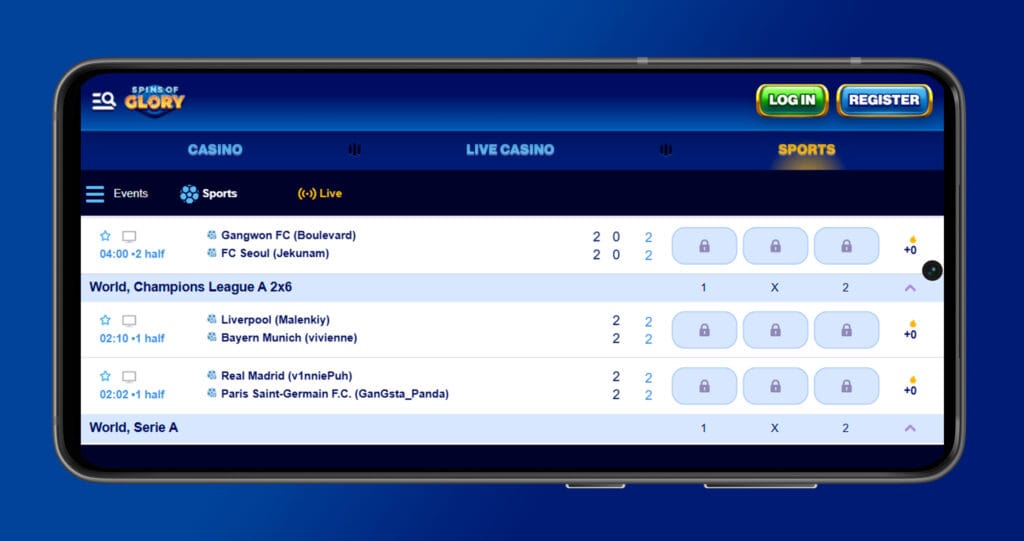
After adding that shortcut, you just tap the icon to jump straight into the casino or sportsbook, with your Spins of Glory Casino login saved if your device settings allow it. The PWA approach means no app store download, no updates to install, and the same security as the web version.
Session and Device Management
We allow multiple device access, but for safety, you may be logged out elsewhere if we detect something unusual. If you move from desktop to mobile, always log out on shared or public computers. On your own phone or PC, you can stay signed in, but it’s still smart to log out if someone else uses your device.
If you ever get a notification about logins you don’t recognise, change your password at once from the account settings and, if needed, contact support. You can also ask us to terminate active sessions and force all devices to re‑login.
Managing Your Account Credentials
Your Spins of Glory Casino login details are the keys to your balance, bonuses, and personal data, so it pays to treat them with care. A few minutes spent on a strong password, stored safely, prevents a lot of stress later.
Username and Password Guidelines
Your main identifier at Spins of Glory is your email plus your password. When choosing a password, avoid anything too obvious like “password123,” your name, or your birth year. Go for something long enough (10+ characters) with a mix of letters, numbers, and symbols.
Never share this password with anyone, including friends or people claiming to be support. We will never ask for your full password in chat or email. If you use password managers, they’re a great way to generate and store strong, unique passwords for your Spins of Glory account and other services.
How to Recover Your Account
If you forget your password, you don’t need to panic or create a new account. On the login page, click “Forgot password.” Enter the email linked to your account and follow the instructions we send you.
You’ll get an email with a secure reset link. Click it, set a new password, and then log in again with those new details. If you don’t see the email, check your spam folder or make sure you used the correct address.
If you also lose access to your email or something more complex happens, contact our support team through live chat or email. We’ll ask some security questions and may request ID to confirm ownership before restoring access. It can take a bit longer, but it’s the safest way to protect your funds and data.
Conclusion
Creating and managing your Spins of Glory Casino account doesn’t need to be complicated. Once you’ve registered, verified your email, and set a strong password, logging in from any device is quick and straightforward. With good habits around logouts, passwords, and verification, you stay secure while enjoying casino games, live tables, and sports betting on your terms.
If you ever hit a snag, from login issues to account recovery, our support team is there 24/7 to help you get back in. Set up your account once, treat your credentials carefully, and you’re good to go for the long run.

FAQ
No, you only need one Spins of Glory account for everything. With a single login, you can jump between casino, live casino, sportsbook, tournaments, VIP, and the shop without re‑registering or moving balances around. That also means all your bonuses, limits, and verification sit under one profile, which keeps things cleaner and makes KYC and payments faster in the long run.
Yes, you can register entirely from your phone using any modern mobile browser like Chrome or Safari. The registration form is the same as on desktop, and once you’re done, you can add us to your home screen as a PWA shortcut, so future access feels just like opening an app. You’ll still be able to upload documents, claim bonuses, and manage payments from mobile without needing a laptop.
Email verification confirms that you own the address you registered with, which is essential for security, legal compliance, and communication. We use that email to send password reset links, login alerts, KYC updates, and important info about your account and bonuses. If the email isn’t verified, you might miss key messages, and in some cases, you won’t be able to fully unlock promos or finish account verification.
First, check your spam, junk, and promotions folders, as some providers filter automated messages by default. Make sure you entered the correct email during registration and that your mailbox isn’t full or blocking new messages. If you still can’t find it after a few minutes, request a new verification email from your profile or contact our live chat, and we’ll double‑check the address and help you activate your account manually if needed.
You can be logged in on more than one personal device, for example, on your PC and phone at the same time. However, for your own safety, we strongly recommend logging out on shared or public devices, like work computers or internet cafés. If our system detects unusual access patterns, such as logins from strange locations, we may auto‑log out sessions and ask you to re‑enter your password or change it as a precaution.
There’s no strict schedule, but updating your password every few months is a solid habit, especially if you use the account a lot. You should always change it immediately if you suspect someone else might know it, if your email was compromised, or if you see any unexpected login activity. Using a unique password for Spins of Glory, preferably stored in a password manager, is much safer than reusing one from social media or email.
Hit the “Forgot password” link on the login page, enter the email you used to register, and we’ll send you a secure reset link. Open that email, follow the link, and set a new password that you haven’t used here before. Once that’s done, you can log back in as normal; if the email doesn’t arrive, double‑check the address you typed and look in spam, then contact support if it’s still not working.
No, support staff can’t see your password in our systems and will never ask you to reveal it in chat, email, or over the phone. If anyone claiming to be from Spins of Glory asks for your full password, treat that as a red flag and don’t share anything. Always contact us through the official site or app, and if in doubt, open a new chat from our homepage and ask to confirm any previous request.
You can log in and explore the site without finishing KYC, and in most cases, you can deposit and play for a while too. However, you’ll need to complete verification before we process significant withdrawals, raise limits, or sometimes before using specific payment methods and promotions. Doing KYC early means fewer interruptions later when you want fast payouts or higher limits, so it’s worth getting it done as soon as you’re comfortable.
Yes, our PWA shortcut is just a faster way to access the same secure site, using the same encryption and protective measures as the full browser version. As long as your phone itself is protected with a PIN, biometrics, or screen lock, and you don’t share your device with people you don’t trust, it’s a very safe way to log in. If you ever lose your phone, you can change your password from another device and ask support to end active sessions for extra peace of mind.